
YOUR BOOKING PAGE – BUILT FOR YOUR CALENDAR
Let customers book.Confirm from your calendar.
Customers book online and the appointment lands straight in your Apple or Google calendar. One tap – confirmed. No commission.
No credit card required – cancel anytime.
FOR YOUR INDUSTRY
Fair, secure – and in your hands.
No commission, no US-cloud risk, no lock-in. You keep control over your appointments, your clients and your data.
Made in Germany Hosted in the EU, no US-cloud gambling.
GDPR-compliant Your data is yours. On request we delete everything.
Personal support Reach us directly – no hotline, no hold music.
No lock-in Monthly cancellable. Export anytime.
FROM SALON OWNERS
Less phone, more time at the chair.
That's what the first salons using EazyBooking tell us.
The best thing that could have happened to us. Far fewer calls and WhatsApp messages – and the appointment book no longer comes on holiday with me. I can finally focus on cutting.
My clients book themselves around the clock now – long after we've closed. I can see the whole day at a glance without ever opening the appointment book, and nothing slips through.
What salons value most
€0 booking fee for your clients
Automatic reminders – fewer no-shows
Every booking straight into your Apple & Google calendar
From sign-up to first booking – in under 5 minutes.
After sign-up, EazyBooking walks you through exactly these steps. Each item gets ticked off. When all four are green, your booking page is live.
Setup
0/4 done
Branding & business info
Logo, colors, address, social links – your booking page in your look.
Add your services
What do you offer? With duration and price. If you have staff, assign services to them.
Set opening hours
Weekly schedule, holidays, time off. Per staff member if everyone has their own hours.
Connect your calendar
Apple Calendar or Google Calendar. Appointments land straight in your calendar.
Booking page is live. You share the link. Customers book. You confirm from your calendar.
SIMPLE PRICING – NO HIDE & SEEK
One plan. All in. 14 days free.
No setup fee, no hidden costs. What you see on top is what you pay.
Complete
Everything you need for your booking page + calendar integration.
plus VAT (country-specific)
Less than one missed booking a month – and no commission, no matter how many new clients you win.
Calculate your savings vs. Treatwell & FreshaNo credit card required.
INCLUDED
- Full booking page with branding
- Bookings land in Apple or Google Calendar
- Confirm directly from calendar
- Automated emails (booking, confirm, decline, reminder)
- Client records with notes, tags & appointment history
- Automatic Google review requests
- Waitlist for fully-booked times
OPTIONAL
- Add staff (per-staff add-on)
- Register custom domain (one-time payment)
- SMS reminders & confirmations (prepaid packs)
If you want to continue after 14 days, you can pay annually or monthly. If not – also fine. No auto-subscription, no hidden costs.
No new software. Your calendar is enough.
Every new booking lands as an invitation in the calendar you already use – no second dashboard, no daily login.
- Works with Apple & Google Calendar – no extra app
- Accept or decline with one tap – your client is notified automatically
- Blocked time automatically closes your booking page
Sat, March 8
Today
12:00 – 12:45
Women's haircut
Lisa M. · 45 min · €38
One tap → Confirmed
Your booking page belongs to you. Not us. Not Treatwell. You.
Other platforms host you on their site – next to three competitors in the same neighborhood. With us, you get your own booking page with your branding, your domain, your customers. No marketplace in between.
- Custom domain (e.g. studio-bella.com) – not a subdomain on a marketplace
- Only your branding visible – no competing salons next to you
- SEO works for you – Google ranks your domain, not ours
Looks like yours. Works like ours.
Logo, colors, photos, social links – all your branding. Behind the scenes runs the full booking logic: live slots, staff selection, automated confirmation emails.
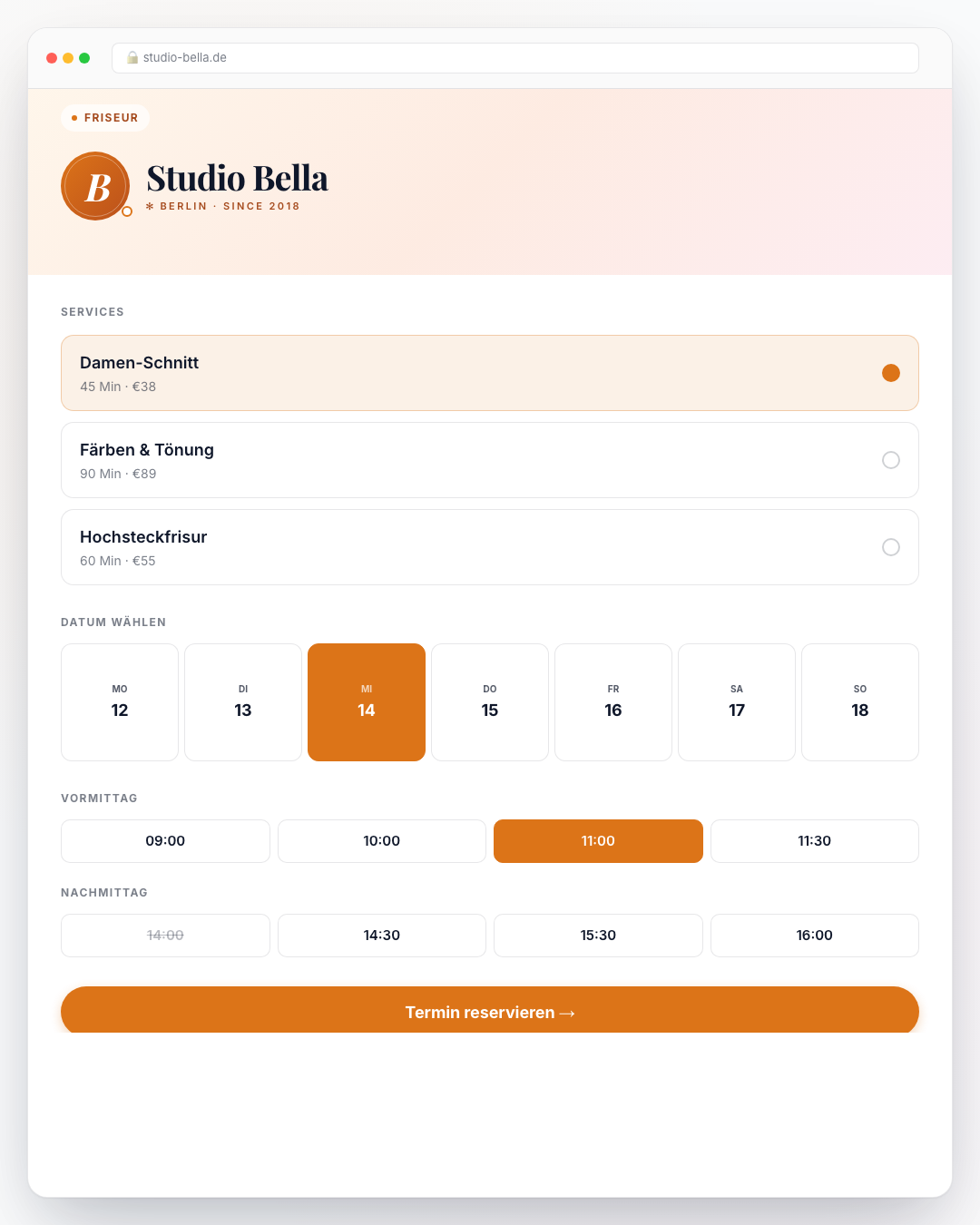
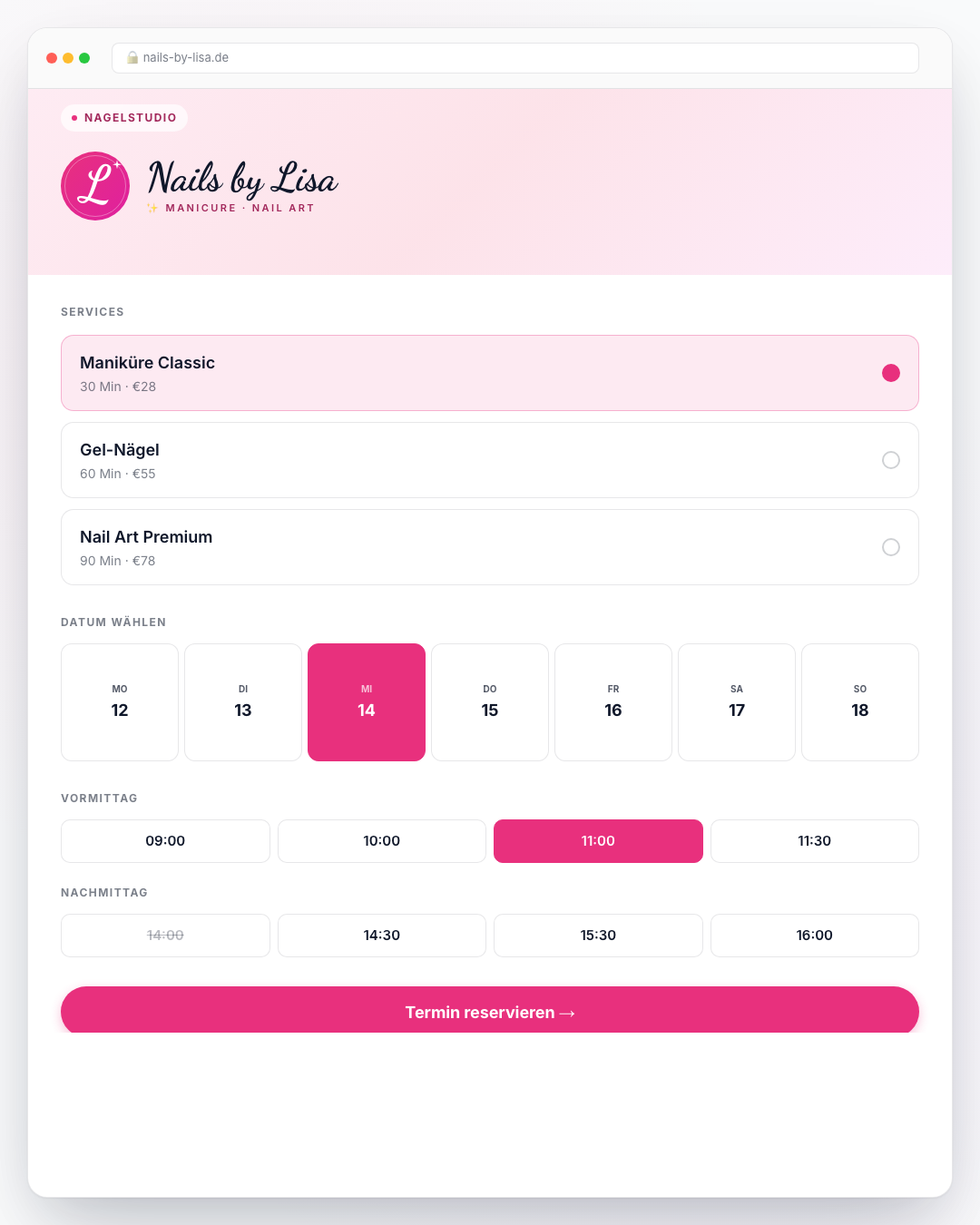
Live slot calculation
From staff availability, service duration and your calendar – always current, never double-booked.
Multilingual
Your booking page speaks 7 languages. International customers? No problem.
One tool. All in.
No app zoo, no duct tape between Calendly, Mailchimp and Notion. EazyBooking does everything – from booking page to reminder email.
Right in your calendar
Bookings land in Apple or Google Calendar – and blocked times in your calendar automatically close booking slots.
Confirm from your calendar
Tap "Accept" in iOS or Google Calendar – appointment is confirmed.
Automated emails
Confirmation, reminder and follow-up are sent automatically.
Staff management
Every staff member with their own calendar and hours.
Custom domain
yoursalon.com instead of a provider subdomain.
GDPR & Made in Germany
Hosted in Germany, GDPR-compliant by default.
Fewer no-shows via SMS
Appointment reminders and confirmations straight to your clients' phones. They show up, your day stays full.
Hi Lena, reminder for your appointment tomorrow at 2pm. See you!
Client records – automatic
Every client and every appointment remembered automatically – with notes, tags and history.
Lena Meyer
12 Termine · seit 2024
What is commission really costing you?
Treatwell takes 35%, Fresha 20% on every new client. Here's what that looks like in euros – an example for a small salon:
Marketplace commission
≈ 472 €
/ month
EazyBooking
59 €
/ month
Your savings
+413 €
/ month
Example: 30 new-client appointments at €45 · 35% commission on first bookings (Treatwell). Fresha: 20%.
What you definitely still want to know.
Does this really work with my Apple Calendar?
Yes. Once you sign up, you connect your Apple Calendar via an app-specific password (instructions appear during setup). Appointments then arrive as invites in your calendar – you tap "Accept" or "Decline" like any other calendar invite.
What does it cost after the trial?
From $65/month plus VAT. Annual billing $649/year – you save two months. No setup fee, no hidden costs.
Can I collect payment when customers book, or only on-site?
Both – and everything in between. Per service you choose: on-site, full online, deposit online (e.g. 20%), or let the customer pick. Stripe Connect set up in 5 minutes, 1.5% platform fee per transaction (nothing else). Multi-currency EUR/USD/GBP, tiered cancellation refunds, saved cards for returning customers. Setmore/Acuity require you to set up Stripe Connect as a separate platform-vendor; ours is plug-and-play.
Do I need my own domain?
No, you immediately get a booking page at yourname.eazybooking.com. You can add a custom domain (e.g. studio-bella.com) anytime, or connect an existing one.
What if a customer books while I'm busy?
The slot is blocked instantly – nobody can double-book. You see the appointment as an invite in your calendar and confirm whenever you have time. Customer gets the confirmation automatically.
Does it work with Outlook?
Currently Apple and Google Calendar only. Outlook support is coming – let us know and your vote goes into the backlog.
What about GDPR and my customer data?
EU hosting, fully GDPR-compliant. Your data is yours, no sale to third parties, no ads. On request we delete everything when you leave.
Can I have multiple staff?
Yes. Each staff member gets their own services, their own hours, and can optionally connect their own calendar. Staff is an add-on to the base plan.
Can I cancel anytime?
Yes. Monthly plans cancel at the end of the month. Annual plans run to year-end. No fine print, no customer-retention theater.
How are you different from Treatwell, Booksy or Fresha?
They host your salon on their marketplace – your customer sees three competing salons next to yours. You build their brand, not your own. With us you get your own booking page with your domain, your branding and your customers. Plus: appointments land in your calendar – you don't need a dashboard at all. And: 0% commission – a flat monthly price, no matter how many bookings.
What happens to my customer data if I cancel?
You can export everything before you leave (customers, appointments, all of it). On request we delete completely. No "data hostage", we give you everything.
Can I embed EazyBooking inside my existing website?
Yes. Copy a short snippet (iframe or script loader) from the admin and paste it into WordPress, Wix, Webflow, Squarespace, Framer, Notion, or any other builder. Auto-resize, theme overrides, and conversion events included.
TOP INDUSTRIES
For every industry, the right solution
START NOW
Your first booking – in 5 minutes.
14 days free. No credit card. No risk.
Already a customer? Sign in →